
Voice Tools
DevExtrasMedical
4.3430.00 Reviews
- Version
- 2.0.177
- Installs
- 500.00K
- Age Rating
- Everyone
Screenshots
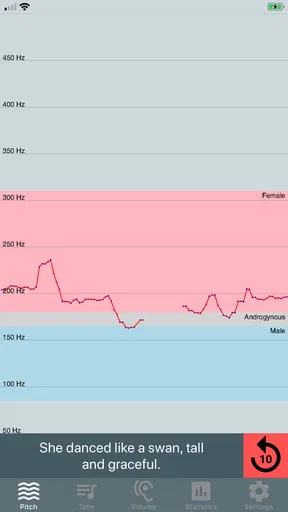
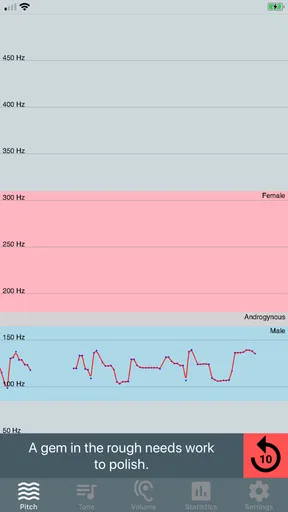
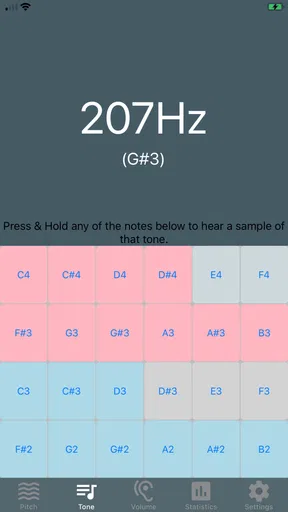
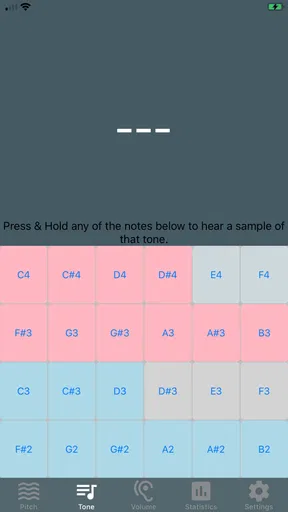
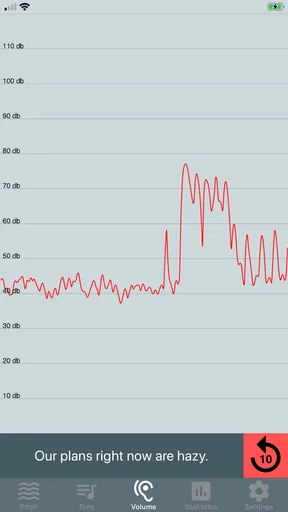
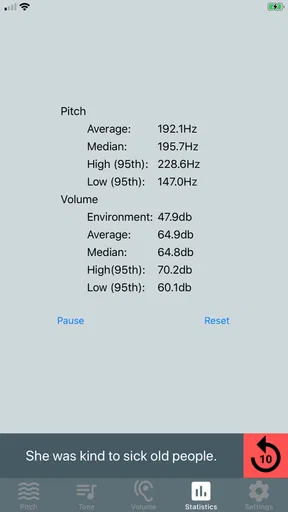
Our Review of Voice Tools
 Analysis by Appyee
I’d treat Voice Tools as a focused speaking aid rather than an all-purpose audio studio. Its most useful idea is simple: let me watch changes in my voice as I speak, so practice can be more deliberate than listening back and guessing. That makes it appealing for voice therapy exercises, speech practice, and anyone curious about pitch, tone, or volume. The trade-off is that a live analyzer is not the same thing as a clinician, a complete recording suite, or an automatic verdict on whether a voice sounds “right.”
A tool for observing your voice in the moment
Voice Tools is a free medical app from DevExtras, with a 4.4 average from around 3.1 thousand ratings and over 500 thousand installs. It is rated for everyone, and version 2.0.173 runs on Android 5.0 or later. There are in-app purchases listed at $19.99 per item, so I would check the options in the app before assuming every feature is included at no cost.
The app’s real appeal is the immediate feedback loop. Rather than relying only on how a recording sounds to your ears, you can use its pitch, tone, and volume analysis while speaking. That can make a short practice session more concrete: try a phrase, notice what changes, then repeat it with one adjustment in mind. It works best as a visual aid for practice, not as a diagnosis or a substitute for professional voice care.
Where the live feedback earns its place
For a therapy exercise, I can see the value in keeping a familiar phrase nearby and saying it at a comfortable pace while watching the analyzer. The key is to change one thing at a time. If I alter pitch, volume, and speaking speed all at once, any feedback becomes harder to interpret. A short, repeatable phrase gives me a more useful comparison than an improvised monologue, especially when I am trying to build consistency rather than chase a particular sound.
It may also suit people who want to become more aware of vocal habits during ordinary speech. Someone preparing for a presentation could practice a few opening sentences and check whether they are speaking loudly enough without pushing their voice. A person working on steadier delivery could use a brief rehearsal to notice when excitement or nerves change their tone. In both cases, the app supports self-observation; it does not tell me what an audience will think or whether a particular vocal target is appropriate for me.
What it does better than a basic recorder
A standard voice memo app is usually the easiest choice when the only goal is to capture a thought, save an interview, or send a spoken message. It tends to keep the workflow simple: record, listen, and share. Voice Tools is more interesting when I want to pay attention to qualities of the voice as they happen. That distinction matters. I would reach for a recorder to preserve an important conversation, but use an analyzer for a deliberate practice round where the process matters as much as the saved sound.
It is also worth separating live analysis from editing. A waveform or a finished audio file can help with review after speaking, while immediate visual feedback can help me adjust during the exercise. Neither approach is automatically superior. If I find myself staring at the display instead of listening to how speaking feels, I would turn away from the screen and use it only between attempts. The tool should support awareness, not become a score I chase.
Small habits that make practice more useful
I would begin in a quiet, familiar setting and use the same short sentence across a few attempts. That reduces distractions and makes it easier to notice a change without mistaking a different phrase or speaking pace for progress. I would also keep the phone in a consistent position from one session to the next; moving it closer or farther away can affect how loud speech is captured, so comparisons may otherwise be misleading.
Another useful habit is to make a note of the exercise goal before opening the app: for example, “speak comfortably and clearly,” rather than “make the graph look better.” That simple distinction can prevent overcorrecting. If practice is part of a plan from a speech-language professional, I would follow that person’s targets and use the app only in the role they recommend. A visual readout can prompt useful questions, but it cannot account for every individual need.
Getting Started with Voice Tools
The first thing you notice when you open Voice Tools is its user-friendly interface. It's straightforward, and you don’t need to be a tech whiz to navigate through it. I was up and running in no time, which is perfect for those moments when inspiration strikes, and you need to capture something on the fly.
Features That Stand Out
One of the things I love about this app is its variety of voice modulation features. Whether you want to sound like a chipmunk or Darth Vader, Voice Tools has got you covered. It’s just so much fun to play around with these options. Plus, the app allows you to adjust the pitch and speed, giving you full control over how your voice sounds.
Beyond the fun stuff, there’s a practical side to Voice Tools. The voice recording feature is reliable and produces clear audio quality, which is essential if you’re using it for professional reasons like podcasting or interviews. I found the noise reduction option particularly useful, especially when recording in a less-than-quiet environment.
Customization and Flexibility
Now, let’s talk customization. The app offers various settings that allow you to personalize your experience. You can save your recordings in different formats, which is a lifesaver if you’re sharing across different platforms. Also, if you’re someone who loves to tweak, the equalizer settings let you fine-tune the sound just the way you like it.
The app also provides a neat feature for those learning new languages or practicing speeches. The voice analyzer gives feedback on your pronunciation and helps you improve your speaking skills. It’s like having a personal language coach in your pocket!
Sharing is Caring
Once you’ve created your masterpiece, sharing it with friends or on social media is a breeze. The app integrates smoothly with popular social media platforms, so you can impress your audience with just a few taps. I found this especially handy during the holiday season when I wanted to send personalized voice messages to friends and family.
Another cool feature is the ability to create and share soundboards. This is perfect for those moments when a simple text or emoji just won’t do. You can express yourself through creative sound bites, making your interactions more lively and engaging.
Easy on the Pocket
On the topic of cost, Voice Tools offers a free version which is quite generous, but if you’re looking to unlock all the features, the premium version is reasonably priced. Given the array of features and the fun factor, I found it to be a worthwhile investment.
"Voice Tools combines practicality with fun, making it a must-have app for anyone working with audio."
In a world where audio content is king, having a tool like Voice Tools can really set you apart. Whether you’re using it professionally or just for fun, it’s bound to enhance your audio experience.
So, if you haven’t already, give Voice Tools a try. It’s like having a mini recording studio in your pocket, ready to unleash your creativity at a moment’s notice. Happy recording!
A realistic routine, without turning practice into a test
Imagine preparing for a presentation during a quiet moment before work. I would choose one sentence from the opening, speak it naturally, and use the live display to notice whether my volume or pitch shifts when I rush. Then I would repeat it at a calmer pace and compare how it feels, rather than trying to hit a perfect-looking reading. A few focused repetitions are more useful than talking continuously while monitoring every fluctuation.
This kind of routine is also handy for someone practicing a short introduction before a meeting or rehearsing a line in a second language. The analyzer can draw attention to a vocal pattern that is easy to miss while speaking, but language learning involves more than vocal characteristics. For vocabulary, grammar, and detailed pronunciation correction, a dedicated language-learning tool or a teacher is a better fit; I would use Voice Tools as a companion for speaking practice, not as a complete course.
Limits worth keeping in mind
Live readings can be affected by the room, the phone’s placement, and how consistently I speak. That makes them useful for comparing attempts made under similar conditions, but less persuasive as a universal measure of vocal quality. A changing display is a prompt to pay attention, not proof that one attempt is better in every meaningful way. If the feedback makes me tense or encourages me to force my voice, I would stop and return to a comfortable speaking level.
There is a practical distinction between an analyzer and a professional assessment, too. Voice Tools may help me carry out a familiar exercise, but it cannot understand the full context behind a voice concern or tailor care to an individual. Anyone dealing with persistent discomfort or a specific medical concern should seek appropriate professional advice rather than relying on an app’s visual feedback. That boundary does not make the app useless; it clarifies the job it can reasonably do.
I would also choose another app when my main need is dependable long-form recording, detailed editing, or a polished podcast workflow. A dedicated recorder or audio editor is generally better suited to organizing takes and refining a finished production. Voice Tools is most compelling when I want to observe and practice my voice, not when I need a complete production desk. Before paying for an in-app option, I would check exactly what it unlocks and whether it relates to the feature I intend to use.
Who will get the most from it
I think it is a sensible choice for people who already have a clear reason to practice: someone following voice exercises, a speaker who wants a quick rehearsal aid, or a curious user who wants to pay closer attention to pitch, tone, and volume. Its free entry point makes it easy to try the basic idea before deciding whether the workflow suits you. The strongest results are likely to come from using it with a specific, modest goal rather than expecting the app to teach every part of voice technique.
I would skip it if I wanted an automatic diagnosis, a guaranteed pronunciation coach, or a professional recording and editing suite. It may also be a poor match for anyone who finds on-screen feedback distracting or tends to judge their voice harshly by numbers and visual changes. In those cases, a simple recorder, guided instruction, or working directly with a qualified professional may be more helpful and less frustrating.
My final take
What I like about Voice Tools is the narrow but useful role it can play: it makes voice practice more observable without requiring a complicated setup. I would use it in short sessions, keep the phone position consistent, and treat its feedback as a guide for reflection rather than a grade. That approach preserves the app’s practical value while avoiding the trap of overanalyzing every sentence.
For an accessible way to explore vocal habits and support a practice routine, Voice Tools is worth trying. It is not the right answer for every audio task, and its readings should not replace expert care, but it can be a useful companion when the goal is simply to listen, notice, and make a thoughtful adjustment.
Verdict
Strengths of Voice Tools
- User-friendly interface makes it easy to navigate.
- Offers a wide range of voice effects.
- High-quality sound output for recordings.
- Supports multiple audio file formats.
- Includes a real-time voice changer feature.
Limitations of Voice Tools
- Contains ads that can be intrusive at times.
- Limited free features; in-app purchases needed.
- Requires internet for certain functionalities.
- Occasional lag when applying voice effects.
- Not optimized for older device models.
Similar Picks in This Category
View All
WebMD: Symptom Checker
WebMD, LLC4.1

Microphone Amplifier
DOSA Apps4.2

Anatomy Learning - 3D Anatomy
3D Medical OU4.5

Period Tracker and Calendar
SimpleInnovation4.9

GoodRx: Prescription Coupons
GoodRx4.8

CVS Health
CVS Pharmacy4.5
Frequently Asked Questions
What are the primary features of Voice Tools?
Voice Tools offers a range of features including voice modulation, recording capabilities, and sound effects. Users can change their voice in real-time, add effects such as echo or reverb, and save recordings for later use. The app also supports file sharing, making it easy to send your creations to friends.
Is Voice Tools available for both Android and iOS?
Yes, Voice Tools is available for download on both Android and iOS platforms. The app can be found on the Google Play Store for Android devices and the Apple App Store for iOS devices. Ensure your device meets the required OS version for compatibility.
Does Voice Tools require an internet connection to function?
Voice Tools primarily works offline, allowing users to access features without an internet connection. However, some functionalities, such as cloud storage or sharing options, may require an internet connection. It is advisable to have a stable connection for these features.
Is the app free to use, or does it have in-app purchases?
Voice Tools is free to download and use, offering a basic set of features. However, it includes in-app purchases for additional effects, premium features, and an ad-free experience. Users can choose to purchase these enhancements to expand the app's capabilities.
How user-friendly is Voice Tools for beginners?
Voice Tools is designed with a user-friendly interface, making it accessible for beginners. The app provides easy-to-follow tutorials and a simple layout for navigating different features. Whether you're new to voice modification or an experienced user, the app is intuitive and straightforward.
